ImageConverter

ImageConverter
License:
Free
Language:
English
Developer:
Developer's website
OS:
Win2000/XP/2003/Vista/7
Added:
See detailed info

Softonic review

Jon Riggall

“Convert or resize folders of images”

by Jon Riggall about ImageConverter

Are you looking for a quick, easy way to convert or resize batches of images? ImageConverter is a neat little application that gets that job done quickly, without any additional fuss.

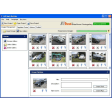
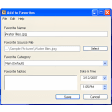
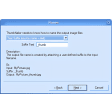
ImageConverter is a tiny app, and doesn't require installation so can be run from a USB stick if you want. The simple interface allows you to choose the location of your image folder, and the destination. Then simply pick the output format you want from PNG, BMP JPEG, GIF or TIFF, and choose the size you want. Images can be resized by percentage, or to a specific pixel size. Hit process, and the job will be quickly completed.

What you can't do with ImageConverter is pick images from within a folder - it will convert all image files in your input folder. While it's nice that it doesn't require installation, it also doesn't save your settings, so every time you open it you need to specify again your input and output folders. These aren't huge problems, and the fact that it does do conversions so well and so quickly, and in such a lightweight program, is impressive.

ImageConverter is a simple, no-frills application which does exactly what it says and nothing more.
Pros
  • Easy to use
  • Fast
Cons
  • Very basic
Free Download ImageConverter 1.2.0.1

ImageConverter is virus free

We have analyzed the latest version of ImageConverter with 30 antivirus engines and it is virus free. See analysis results.

TESTED VIRUS FREE - Softonic GUARANTEED

Review and rate ImageConverter

Your avatar

Your opinion is important.
Help other users - be the first to review this program.

Review
  1. Maximum: 75 characters

  2. See example

Pros and Cons
Rate
  1. What rating would you give ImageConverter?

    You need to fill in all fields

    • Usability:

      Not rated
    • Stability:

      Not rated
    • Installation:

      Not rated
    • Functionality:

      Not rated
    • Appearance:

      Not rated
    • Overall rating:

      Not rated
  2. Don't worry, we won't make your email address public.

You're not allowed to share serial numbers, cracks, etc. or link to pages that contain them. If you do, your user account will be deleted, your IP address logged and legal action will be taken.

Get started - just ask a question!

Write a title for your question.

Alternativesto ImageConverter

  • In English:
    GPhotospace
    GPhotospace

    Fast, simple, and private online photo storage

    Softonic rating:
    • 8/10
    User rating:
    • 10/10
  • Better rating:
    ColorPad
    ColorPad

    Lightweight free RGB color picking tool

    Softonic rating:
    • 8/10
    User rating:
    • 6/10
Compare with ImageConverter
Download rank: General

77 of 79

Softonic rating:
  • Good
  • 7/10
Your rating:
Your rating
  • 0

Review and rate this program

Top Downloads: General

  • United States
  • Global

  1. Download photos from Instagram

Reviews of ImageConverter in other languages